Quick Start
This guide walks through the main parts of manim_extensions and shows how
to use them in a Manim scene.
Installation
Install the latest stable release from PyPI:
pip install manim_extensions
The only runtime dependency is manim.
If you want to use ChineseMathTex, make
sure xelatex and the xeCJK LaTeX package are available on your system.
Basic import
Import the public API directly from manim_extensions:
from manim_extensions import (
    ChineseMathTex,
    LabelDot,
    MathTexLine,
    MathTexBrace,
    MathTexDoublearrow,
    ExtendedLine,
    PerpendicularLine,
    PerpendicularSign,
    CircleInt,
    LineCircleInt,
    LineInt,
    LineArcInt,
    TangentPoint,
    VisDrawArc,
    TypeWriter,
)
Annotated mobjects
CircleInt() and
LabelDot are useful when you want to label
key points or show intersections:
Example: QuickstartAnnotatedScene 
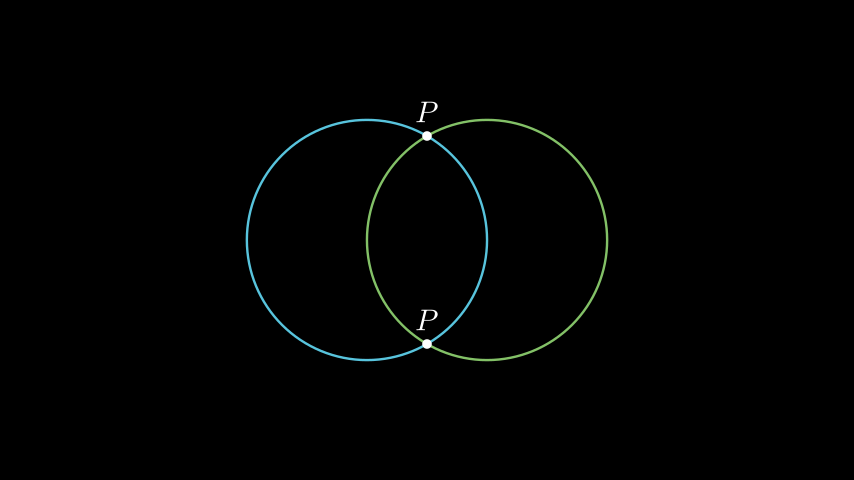
from manim import *
from manim_extensions import CircleInt, LabelDot

class QuickstartAnnotatedScene(Scene):
    def construct(self):
        c1 = Circle(radius=2, color=BLUE).shift(LEFT)
        c2 = Circle(radius=2, color=GREEN).shift(RIGHT)
        pts = CircleInt(c1, c2)

        self.add(c1, c2)
        if pts:
            for p in pts:
                self.add(LabelDot("P", p, label_pos=UP, buff=0.15))
from manim import *
from manim_extensions import CircleInt, LabelDot

class QuickstartAnnotatedScene(Scene):
    def construct(self):
        c1 = Circle(radius=2, color=BLUE).shift(LEFT)
        c2 = Circle(radius=2, color=GREEN).shift(RIGHT)
        pts = CircleInt(c1, c2)

        self.add(c1, c2)
        if pts:
            for p in pts:
                self.add(LabelDot("P", p, label_pos=UP, buff=0.15))
Geometry helpers
The geometry module provides analytic-geometry functions that return plain points, so you can use them with any Manim mobject:
Example: QuickstartGeometry 
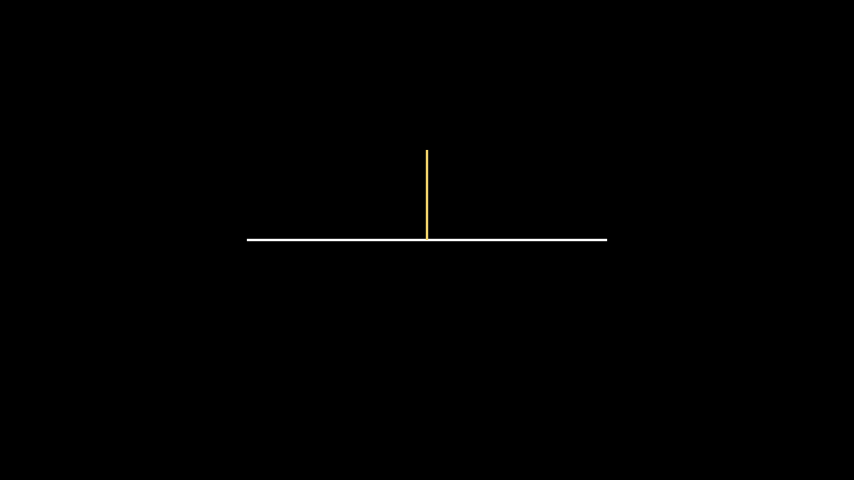
from manim import *
from manim_extensions import LineInt, PerpendicularLine, LabelDot

class QuickstartGeometry(Scene):
    def construct(self):
        line = Line(LEFT * 3, RIGHT * 3)
        perp = PerpendicularLine(UP * 1.5, line, color=YELLOW)
        self.add(line, perp)
from manim import *
from manim_extensions import LineInt, PerpendicularLine, LabelDot

class QuickstartGeometry(Scene):
    def construct(self):
        line = Line(LEFT * 3, RIGHT * 3)
        perp = PerpendicularLine(UP * 1.5, line, color=YELLOW)
        self.add(line, perp)
Animations
VisDrawArc() draws an arc while showing a
moving radius, and TypeWriter reveals
Text character by character:
Example: QuickstartAnimations 
from manim import *
from manim_extensions import VisDrawArc, TypeWriter

class QuickstartAnimations(Scene):
    def construct(self):
        arc = Arc(start_angle=0, angle=PI, radius=2, color=YELLOW)
        VisDrawArc(self, arc, axis=OUT, run_time=2)

        text = Text("Hello Extensions").shift(DOWN * 2)
        self.play(TypeWriter(text, interval=0.1))
from manim import *
from manim_extensions import VisDrawArc, TypeWriter

class QuickstartAnimations(Scene):
    def construct(self):
        arc = Arc(start_angle=0, angle=PI, radius=2, color=YELLOW)
        VisDrawArc(self, arc, axis=OUT, run_time=2)

        text = Text("Hello Extensions").shift(DOWN * 2)
        self.play(TypeWriter(text, interval=0.1))
Bundled plugins
manim_extensions also ships three ready-to-use plugins. Each is documented
in the Reference Manual section:
GearBox – involute gears and gear trains.
Compass – compass, ruler, and pencil animations.
MindMap – mind maps, timelines, and catalog trees.
For example, a gear pair can be created with:
Example: QuickstartGear 
from manim import *
from manim_extensions.gearbox import Gear

class QuickstartGear(Scene):
    def construct(self):
        gear1 = Gear(15, stroke_opacity=0, fill_color=WHITE, fill_opacity=1)
        gear2 = Gear(25, stroke_opacity=0, fill_color=RED, fill_opacity=1)
        gear1.shift(-gear1.rp * 1.5 * RIGHT)
        gear2.mesh_to(gear1)

        self.add(gear1, gear2)
        self.play(
            Rotate(gear1, gear1.pitch_angle, rate_func=linear),
            Rotate(gear2, -gear2.pitch_angle, rate_func=linear),
            run_time=4,
        )
from manim import *
from manim_extensions.gearbox import Gear

class QuickstartGear(Scene):
    def construct(self):
        gear1 = Gear(15, stroke_opacity=0, fill_color=WHITE, fill_opacity=1)
        gear2 = Gear(25, stroke_opacity=0, fill_color=RED, fill_opacity=1)
        gear1.shift(-gear1.rp * 1.5 * RIGHT)
        gear2.mesh_to(gear1)

        self.add(gear1, gear2)
        self.play(
            Rotate(gear1, gear1.pitch_angle, rate_func=linear),
            Rotate(gear2, -gear2.pitch_angle, rate_func=linear),
            run_time=4,
        )
See GearBox for more details.
Next steps
Browse the Example Gallery gallery for more rendered snippets.
Read the Reference Manual for the complete API.
Check the Installation page for development setup.